Best Android Head Units & CarPlay Screens in 2026
Upgrading your car’s infotainment system is one of the easiest ways to make an older vehicle feel significantly more modern.
You don’t necessarily need a new car to get wireless Apple CarPlay, Android Auto, Google Maps, Spotify, voice control, a larger touchscreen, and backup-camera support.
In 2026, there are two main ways to upgrade an older vehicle:
Replace the factory stereo with a modern Android or CarPlay head unit, or keep the original stereo and add a portable CarPlay screen.
Both approaches can dramatically improve your driving experience, but they suit very different buyers.
A vehicle-specific Android head unit such as Dasaita can provide a large OEM-style touchscreen, native Android apps, wireless CarPlay, Android Auto, DSP audio controls, and deeper vehicle integration.
A portable system such as Carpuride is much easier to install because it sits on the dashboard and leaves the factory stereo untouched.
Traditional manufacturers such as Pioneer and Sony offer another approach, focusing more heavily on polished CarPlay and Android Auto integration rather than running a full Android operating system.
So which type should you choose?
In this guide, we’ll compare some of the best Android head units and CarPlay screens in 2026, explain the differences between them, and help you decide which upgrade makes the most sense for your vehicle.
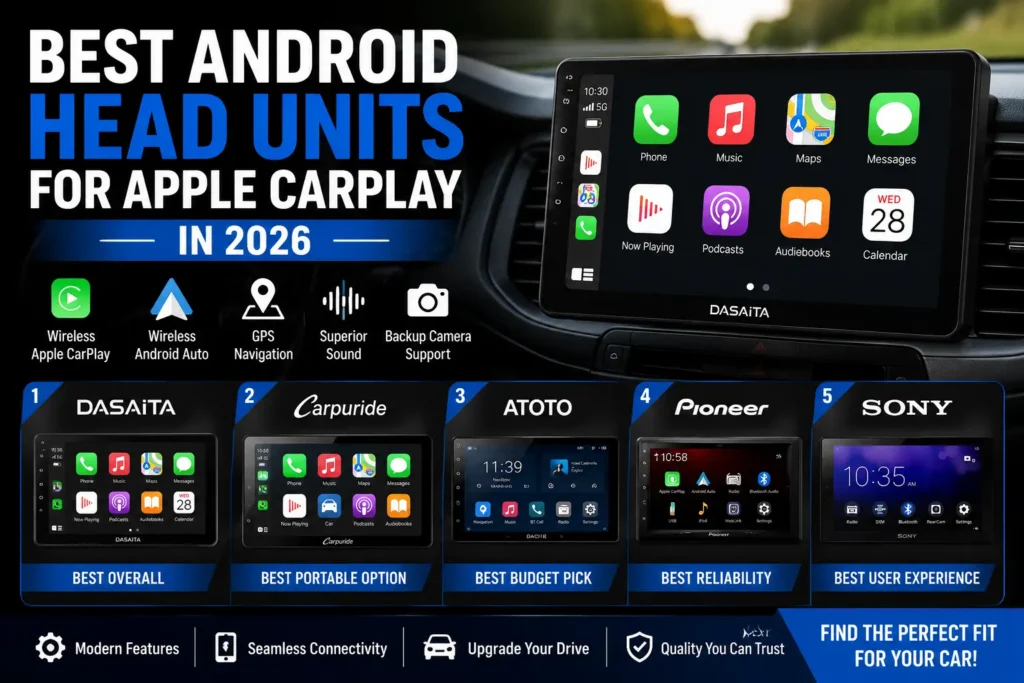
Quick Picks: Best Android Head Units & CarPlay Screens
| Pick | Brand | Best For | Installation |
|---|---|---|---|
| 🏆 Best Overall Android Head Unit | Dasaita | Full OEM-style upgrade | Moderate |
| ⭐ Best Portable CarPlay Screen | Carpuride | Easy installation | Very Easy |
| 💰 Best Value Android Option | ATOTO | Features for the money | Moderate |
| 🔧 Best Traditional Receiver | Pioneer | Reliability & integration | Moderate |
| ✨ Best for Simplicity | Sony | Clean user experience | Moderate |
Our Top Recommendation
Dasaita is our top choice for drivers who want to completely modernize an older vehicle with a large Android touchscreen and deeper dashboard integration.
However, it isn’t automatically the best choice for everyone.
If you mainly want wireless Apple CarPlay or Android Auto without removing the factory stereo, Carpuride is considerably easier to install.
Android Head Unit vs Portable CarPlay Screen
Before choosing a brand, you need to decide what type of upgrade you actually want.
This is more important than comparing individual specifications.
| Feature | Android Head Unit | Portable CarPlay Screen |
|---|---|---|
| Replaces factory stereo | Yes | No |
| Installation | Moderate–Difficult | Easy |
| Apple CarPlay | Usually | Usually |
| Android Auto | Usually | Usually |
| Native Android apps | Often | Model dependent |
| OEM-style appearance | Better | Limited |
| Audio integration | Usually better | AUX/Bluetooth/FM |
| Vehicle compatibility | Critical | Much broader |
| Easy to remove | No | Yes |
| Easy to move between cars | No | Yes |
| Best Example | Dasaita | Carpuride |
If your existing stereo works well and you simply want CarPlay, replacing the entire system may be unnecessary.
On the other hand, if you plan to keep your vehicle for several years and want a complete infotainment upgrade, an integrated head unit can provide a much cleaner result.
#1 Dasaita – Best Overall Android Head Unit
Best for: Drivers who want a complete OEM-style infotainment upgrade
Dasaita is our top Android head-unit pick because its products combine powerful Android hardware with vehicle-specific integration.
Instead of installing a generic universal screen, many Dasaita systems are designed around specific vehicles.
The company offers configurations for numerous Toyota, Honda, Jeep, Subaru, Ford, Nissan and other models.
This approach can result in a much more factory-like installation.
Current Dasaita G13 configurations can include Qualcomm 665 processors, Android 13, 6GB or 8GB of RAM, up to 256GB of storage, QLED displays, wireless Apple CarPlay, wired/wireless Android Auto, Wi-Fi, 4G LTE and steering-wheel-control support.
Some vehicle-specific versions also integrate CANBUS, factory backup cameras and other OEM functions. For example, Dasaita’s current Honda Accord G13 Plus kit advertises retention of steering-wheel controls, the backup camera, A/C information, radar information, AUX and USB through its vehicle-specific harness and CANBUS system.
Why We Like Dasaita
The biggest advantage is that Dasaita provides much more than CarPlay.
Because the system runs Android, you can potentially install compatible apps directly onto the head unit.
That means you can use apps such as:
- Google Maps
- Waze
- Spotify
- YouTube Music
- Internet radio
- OBD apps
- Other compatible Android applications
With Wi-Fi or mobile connectivity, the head unit can operate more independently from your smartphone.
Audio Features
Dasaita also offers considerably more audio control than most portable CarPlay screens.
Depending on the model, features can include:
- DSP processing
- Multi-band EQ
- Optical audio output
- Subwoofer controls
- Balance and fader
- Multiple audio outputs
Some current G13 systems use DTS processing and provide optical output, making them particularly interesting for drivers upgrading more than just the dashboard screen.
The Catch: Compatibility
Dasaita’s greatest strength is also its biggest complication.
Because these systems integrate with the vehicle, you need to make sure you’re buying the correct version.
Check:
- Vehicle year
- Model
- Trim level
- Factory stereo
- Factory amplifier
- Backup camera
- Steering-wheel controls
- CANBUS configuration
Vehicles equipped with premium JBL, Bose, Harman Kardon or other factory audio systems may require different hardware or adapters.
Wireless software can also occasionally introduce problems. For example, Dasaita’s support forum documented a July 2026 cluster of Android Auto disconnections that support attributed to Android Auto 17.2 rather than the head unit itself.
This is why we strongly recommend checking compatibility before purchasing.
Dasaita Pros
- Excellent vehicle-specific integration
- Large QLED displays on many models
- Wireless Apple CarPlay
- Android Auto
- Full Android operating system
- Native Android apps
- Strong hardware specifications
- Extensive audio customization
- Steering-wheel-control support on compatible vehicles
- Factory camera support on selected configurations
- Wi-Fi and 4G LTE available on selected models
Dasaita Cons
- More complicated installation
- Compatibility needs careful checking
- Android software may occasionally require troubleshooting
- Factory features can vary by vehicle
- More difficult to remove than a portable display
Persiavo Verdict
Rating: 4.1/5
Dasaita is our choice for buyers who want to replace an outdated factory infotainment system with something significantly more capable.
If you’re considering one, read our Dasaita Review 2026 for a deeper look at installation, reliability, vehicle compatibility, audio, software, and real-world ownership.
You can also visit the Dasaita Store on Persiavo to check current coupons and promotions before ordering.
#2 Carpuride – Best Portable CarPlay Screen
Best for: Drivers who want CarPlay without replacing the factory stereo
Technically, Carpuride isn’t the same type of product as a traditional replacement head unit.
We’re including it because many people searching for an Android head unit don’t actually need to replace their existing stereo.
They simply want:
- Apple CarPlay
- Android Auto
- Navigation
- Spotify
- Voice controls
- A larger display
Carpuride provides a much easier way to get those features.
Instead of removing your existing stereo, you mount the Carpuride display on the dashboard, connect power, pair your smartphone, and route audio through the vehicle.
That’s it.
Why Choose Carpuride?
Installation is its biggest advantage.
You generally don’t need:
- Dashboard trim kits
- CANBUS adapters
- Wiring modifications
- Factory stereo removal
- Professional installation
This also makes Carpuride particularly useful for leased vehicles or cars you don’t plan to keep long-term.
You can remove the screen and potentially use it in another vehicle later.
CarPlay and Android Auto
Carpuride offers multiple displays supporting wireless Apple CarPlay and Android Auto.
The company has also expanded beyond simple mirroring screens. For example, its W701 Plus currently combines a 7-inch display with Android 12, 2GB RAM/32GB storage, app installation, wireless CarPlay and wireless Android Auto.
Other Carpuride models prioritize larger displays, cameras or motorcycle use.
Audio Integration
This is where portable screens can be less elegant than replacement head units.
Depending on the model and vehicle, audio may be routed through:
- AUX
- Bluetooth
- FM transmission
- Built-in speaker
If your vehicle has AUX or compatible Bluetooth integration, the experience can be quite good.
FM transmission works with almost any vehicle, but we wouldn’t choose it when audio quality is important.
Carpuride Pros
- Very easy installation
- No need to remove factory stereo
- Wireless Apple CarPlay
- Android Auto
- Large touchscreen options
- Works with many older vehicles
- Easy to remove
- Can potentially move between vehicles
- Backup-camera options
- Motorcycle-specific models available
Carpuride Cons
- Doesn’t look as integrated as Dasaita
- Visible cables may be required
- Audio routing varies by vehicle
- FM audio isn’t ideal
- Large displays can obstruct smaller dashboards
- Reliability and support feedback can vary
Persiavo Verdict
Rating: 4.0/5
Carpuride is the better option for people who want a quick infotainment upgrade without modifying the vehicle.
Read our Carpuride Review 2026 for a detailed look at wireless CarPlay, Android Auto, installation, audio, reliability and customer feedback.
Before ordering, check the Carpuride Store on Persiavo for current discounts and coupon codes.
#3 ATOTO – Best Value Android Option
Best for: Buyers who want lots of features without spending premium-brand money
ATOTO has become a popular name in aftermarket automotive electronics because it offers a broad range of infotainment products at competitive prices.
The company’s ecosystem includes head units as well as CarPlay/Android Auto accessories and AI boxes.
That makes ATOTO particularly interesting for buyers who enjoy customizing their vehicle technology.
Why Consider ATOTO?
ATOTO tends to emphasize functionality.
Depending on the product, features can include:
- Apple CarPlay
- Android Auto
- Bluetooth
- Android applications
- Navigation
- Camera integration
- Audio customization
- Wireless connectivity
The company also continues to develop wireless CarPlay/Android Auto accessories. Its current AD6, for example, can convert compatible wired CarPlay/Android Auto systems to wireless while adding Android functionality.
ATOTO Pros
- Strong feature-to-price ratio
- Broad product ecosystem
- CarPlay and Android Auto options
- Good choice for DIY installers
- Multiple accessories available
- Extensive customization
ATOTO Cons
- Product lineup can be confusing
- Installation varies by vehicle
- Universal systems may not look as OEM as vehicle-specific Dasaita units
- Choosing the correct configuration requires research
Persiavo Verdict
ATOTO is worth considering if value and flexibility matter more than having a completely factory-style installation.
It’s particularly appealing to DIY users comfortable comparing specifications and configuring their own system.
#4 Pioneer – Best Traditional Car Stereo Upgrade
Best for: Buyers prioritizing a mature automotive-audio platform
Not everyone needs Android running directly on their dashboard.
For many drivers, what matters is simply having a reliable receiver with:
- Apple CarPlay
- Android Auto
- Bluetooth
- Navigation through their phone
- Good audio performance
This is where established automotive audio brands such as Pioneer remain attractive.
Rather than trying to turn your dashboard into an Android tablet, a traditional receiver focuses on doing the core infotainment jobs well.
Why Choose Pioneer?
The biggest reason is predictability.
Pioneer has a long history in aftermarket automotive audio and works within a mature installation ecosystem.
Professional installers are also more likely to be familiar with mainstream double-DIN receivers and the adapters needed to integrate them into different vehicles.
Pioneer Pros
- Established automotive-audio brand
- Strong CarPlay integration
- Android Auto options
- Good audio features
- Large installer ecosystem
- Broad compatibility through aftermarket adapters
Pioneer Cons
- Less flexible than a full Android head unit
- Native Android apps generally aren’t the focus
- Installation hardware can increase total cost
- Large-screen models can become expensive
Persiavo Verdict
Choose Pioneer if you’d rather have a traditional, focused infotainment system than an Android tablet built into the dashboard.
For buyers who prioritize reliability over customization, that can be the smarter trade-off.
#5 Sony – Best for a Clean User Experience
Best for: Drivers who want simplicity
Sony takes a similar approach to Pioneer.
Rather than trying to provide every possible Android feature, Sony’s aftermarket receivers tend to focus on smartphone integration, audio, and a straightforward interface.
That’s appealing for drivers who don’t want to manage another Android device.
You get into the car, connect your phone, launch CarPlay or Android Auto, and drive.
Why Choose Sony?
Simplicity.
Some buyers love the customization available from Android head units.
Others don’t want it.
If you’re already using your smartphone for navigation, music, calls, and messaging, a traditional CarPlay receiver may provide everything you actually need.
Sony Pros
- Clean interface
- Strong smartphone integration
- Established electronics brand
- Good audio reputation
- Straightforward everyday operation
Sony Cons
- Less customizable than Android head units
- No broad native Android-app experience
- Premium models can be expensive
- Vehicle-specific trim and adapters may be required
Persiavo Verdict
Sony is a strong option for buyers who want a simple CarPlay/Android Auto experience without the complexity of a full Android head unit.
Full Comparison
| Brand | Best For | Native Android | Wireless CarPlay | Android Auto | Installation | OEM Integration |
|---|---|---|---|---|---|---|
| Dasaita | Full infotainment upgrade | ✅ | ✅ | ✅ | Moderate | ⭐⭐⭐⭐⭐ |
| Carpuride | Easy portable upgrade | Model dependent | ✅ | ✅ | Very Easy | ⭐⭐☆☆☆ |
| ATOTO | Value & customization | Model dependent | Model dependent | Model dependent | Moderate | ⭐⭐⭐☆☆ |
| Pioneer | Traditional receiver | ❌ | Model dependent | Model dependent | Moderate | ⭐⭐⭐⭐☆ |
| Sony | Simple premium experience | ❌ | Model dependent | Model dependent | Moderate | ⭐⭐⭐⭐☆ |
Always verify the exact model before purchasing because features can vary substantially within each manufacturer’s lineup.
What to Look for Before Buying an Android Head Unit
Choosing a head unit based only on screen size is a mistake.
There are several other specifications that matter more.
1. Vehicle Compatibility
This should always come first.
Check the exact:
Year + Make + Model + Trim
Then determine whether your vehicle has:
- Factory amplifier
- Premium audio
- Backup camera
- 360-degree camera
- Steering-wheel controls
- Factory USB
- Climate controls integrated into the stereo
- Other infotainment-dependent functions
The more deeply integrated your factory stereo is with the vehicle, the more important compatibility becomes.
2. RAM
If you’re buying a full Android head unit, RAM affects responsiveness.
For basic CarPlay use, you don’t necessarily need enormous amounts of memory because much of the processing happens on your smartphone.
Native Android apps are different.
If you plan to run navigation, Spotify and other apps directly on the stereo, more RAM can improve multitasking.
Current higher-end Dasaita G13 configurations, for example, offer 6GB or 8GB RAM.
3. Storage
Storage matters if you intend to install Android apps or store offline media.
64GB is comfortable for many users.
128GB or 256GB becomes useful if you want more applications, offline maps or local media.
Again, this matters far less on a receiver used primarily for CarPlay.
4. Processor
Don’t ignore the processor.
Low-cost Android head units can look impressive in product photos but feel frustratingly slow in everyday use.
Launching apps, switching screens, booting, navigation and multitasking all depend on the hardware.
This is one reason we like the Qualcomm-based Dasaita G13 platform.
5. CANBUS Integration
CANBUS can allow an aftermarket head unit to communicate with vehicle systems.
Depending on the vehicle and adapter, this may help retain features such as:
- Steering-wheel controls
- Reverse-camera activation
- Door information
- Climate information
- Vehicle settings
But CANBUS support doesn’t automatically guarantee that every factory feature will work.
Check your exact vehicle.
6. Factory Amplifier Compatibility
This is easy to overlook.
Vehicles equipped with factory premium audio may use a separate amplifier.
Examples include systems from:
- JBL
- Bose
- Harman Kardon
- Mark Levinson
- Infinity
Replacing the factory stereo without the correct integration can cause problems with volume, speakers, subwoofers or audio quality.
Verify amplifier compatibility before ordering.
7. Backup Camera Support
If your car already has a factory camera, check whether the new head unit can retain it.
Also verify whether it retains features such as:
- Dynamic guidelines
- 360-degree view
- Multiple camera angles
Basic camera compatibility doesn’t necessarily mean every OEM camera feature will remain available.
8. DSP and Audio
If sound quality matters, look beyond screen specifications.
Features such as DSP, EQ controls, subwoofer outputs and optical audio can be important when building a more advanced audio system.
For casual listening, these features may be unnecessary.
For enthusiasts, they can make a significant difference.
9. Wireless vs Wired CarPlay
Wireless CarPlay is extremely convenient.
Get into the car and your phone can connect automatically.
But wired CarPlay still has advantages:
- Consistent connection
- Lower battery drain
- Simultaneous charging
- Potentially fewer wireless issues
Ideally, choose a system that supports both.
10. Screen Size
Bigger isn’t always better.
A huge 12-inch screen may look fantastic in a truck or SUV but overwhelm the dashboard of a compact car.
Consider:
- Windshield visibility
- Air vents
- Physical controls
- Dashboard proportions
- Screen glare
A well-integrated 9-inch screen can be better than a poorly positioned 12-inch display.
Which Upgrade Is Right for Your Car?
Here’s the simplest way to decide.
Choose Dasaita if:
You want to completely replace an outdated factory infotainment system and gain native Android functionality.
Choose Carpuride if:
You mainly want wireless CarPlay or Android Auto and don’t want to remove the factory stereo.
Choose ATOTO if:
You’re a DIY-oriented buyer looking for lots of functionality at a competitive price.
Choose Pioneer if:
You prioritize a mature automotive-audio ecosystem and conventional head-unit experience.
Choose Sony if:
You want a clean, straightforward interface and don’t care about running Android apps directly on the stereo.
Is an Android Head Unit Better Than Apple CarPlay?
This question comes up frequently, but the two aren’t really competitors.
An Android head unit is the device operating system.
Apple CarPlay is a smartphone interface.
A good Android head unit can support CarPlay.
That means you can use native Android when you want deeper functionality and switch to CarPlay when you want your iPhone’s familiar interface.
For many enthusiasts, having both is ideal.
Do You Need Native Android?
Probably not if your main goals are:
- Google Maps
- Spotify
- Calls
- Messages
- Podcasts
- Waze
CarPlay or Android Auto already handles these tasks extremely well.
Native Android becomes more useful if you want:
- Apps installed directly on the head unit
- Standalone navigation
- OBD applications
- Offline media
- More customization
- Split-screen applications
- Independent internet connectivity
That’s why Dasaita and similar Android systems appeal more strongly to technology enthusiasts.
Should You Install the Head Unit Yourself?
It depends on the vehicle.
A straightforward plug-and-play Dasaita installation can be manageable for an experienced DIY user.
A vehicle with:
- Premium amplified audio
- 360 cameras
- Integrated climate controls
- Complex CANBUS functions
may be a completely different story.
If you’re uncertain, professional installation can be worth the cost.
A perfectly installed mid-range head unit is usually better than an expensive head unit installed incorrectly.
Frequently Asked Questions
What is the best Android head unit in 2026?
For buyers looking for a full vehicle-specific Android upgrade, Dasaita is our current top pick because of its combination of Android hardware, large displays, wireless CarPlay, Android Auto and vehicle-specific integration.
However, the best option depends heavily on your vehicle.
Is Dasaita better than Carpuride?
They solve different problems.
Dasaita replaces the factory head unit and offers deeper vehicle integration.
Carpuride leaves the factory stereo untouched and adds a separate screen.
Choose Dasaita for integration and Carpuride for simplicity.
Can I add Apple CarPlay to an older car?
Yes.
You can either replace the factory stereo with a CarPlay-compatible head unit or install a portable CarPlay display.
Portable displays are usually the easiest option.
Can Android head units run Google Maps without a phone?
Full Android head units can potentially run Google Maps directly when they have an internet connection or appropriate offline maps.
How much RAM should an Android head unit have?
For a modern Android head unit, we’d prefer at least 4GB RAM, with 6GB or 8GB being more attractive for buyers who plan to use multiple native Android apps.
Is wireless CarPlay worth it?
For most users, yes.
Automatic wireless connection makes short daily trips considerably more convenient.
However, retaining wired CarPlay as an option is useful for charging and troubleshooting.
Will I lose my steering-wheel controls?
Not necessarily.
Vehicle-specific head units with compatible CANBUS integration can often retain steering-wheel controls.
However, compatibility needs to be checked for your exact vehicle.
Will an aftermarket head unit work with my factory backup camera?
Many do, but not every system retains every factory camera feature.
Check your exact vehicle and head-unit configuration before purchasing.
Are cheap Android head units worth buying?
Some can offer excellent value, but specifications don’t tell the entire story.
Software stability, CANBUS compatibility, audio integration, firmware support and installation quality can matter more than having the biggest screen or highest advertised specifications.
Final Verdict
There is no single best infotainment upgrade for every driver.
The right choice depends on how much of your factory system you’re willing to change.
| Persiavo Award | Winner |
|---|---|
| 🏆 Best Overall Android Head Unit | Dasaita |
| ⭐ Best Portable CarPlay Screen | Carpuride |
| 💰 Best Value Option | ATOTO |
| 🔧 Best Traditional Receiver | Pioneer |
| ✨ Best for Simplicity | Sony |
For drivers who want a fully integrated Android infotainment upgrade, Dasaita is our top pick. Its vehicle-specific approach, powerful Android hardware, wireless CarPlay, Android Auto and extensive customization make it one of the most interesting options for modernizing an older vehicle. Current G13 models reinforce that positioning with Qualcomm 665 hardware, up to 8GB RAM/256GB storage on selected configurations, wireless CarPlay and wired/wireless Android Auto.
But Dasaita isn’t necessarily the best choice if you only want CarPlay.
For drivers who want the easiest possible upgrade, Carpuride makes more sense. You can keep the factory stereo, avoid extensive installation work and still gain modern smartphone integration.
ATOTO remains worth considering for value-focused DIY buyers, while Pioneer and Sony make more sense for drivers who prefer a traditional automotive receiver rather than a full Android experience.
Our Recommendation
Want the most complete upgrade? → Dasaita
Want the easiest upgrade? → Carpuride
Want value and customization? → ATOTO
Want a traditional receiver? → Pioneer
Want simplicity? → Sony
Before buying any replacement head unit, always verify compatibility with your exact vehicle year, model, trim, factory amplifier and camera configuration.
And if you’re considering our two leading options, read our full Dasaita Review and Carpuride Review before deciding.
Where to Find Current Deals
Before purchasing, check the Dasaita Store on Persiavo and Carpuride Store on Persiavo for current coupon codes and promotions.
For Dasaita, Persiavo currently has a dedicated store page with active deal coverage.
Make Smarter Buying Decisions
Get new reviews, product comparisons, brand discoveries, and practical shopping guides delivered to your inbox.
New Reviews
Shopping Guides
Brand Discoveries