
Dasaita Review 2026: Are These Android Head Units Worth It?
Upgrading the infotainment system is one of the easiest ways to make an older vehicle feel significantly more modern.
A large touchscreen, wireless Apple CarPlay, Android Auto, Google Maps, Spotify, Bluetooth, backup-camera support, and downloadable Android apps can transform a dashboard that otherwise feels a decade out of date.
That’s exactly the market Dasaita targets.
Rather than selling portable screens that sit on top of your dashboard, Dasaita specializes in replacement Android head units designed to integrate directly into specific vehicles.
The result can look considerably more factory-installed than a portable CarPlay display while providing far more functionality than many original infotainment systems.
But replacing your factory head unit is a much bigger commitment than mounting another screen.
Compatibility matters. Installation matters. Software stability matters. And perhaps most importantly, you need to know whether factory features will continue working after the upgrade.
So, is Dasaita actually worth buying?
In this Dasaita Review 2026, we’ll examine its Android head units, CarPlay and Android Auto performance, installation, audio, vehicle compatibility, everyday usability, customer feedback, reliability, pros and cons, and whether a Dasaita head unit is the right upgrade for your car.
Looking for a better price? Check our Dasaita Store on Persiavo for current coupon codes, promotions, and available deals before ordering.
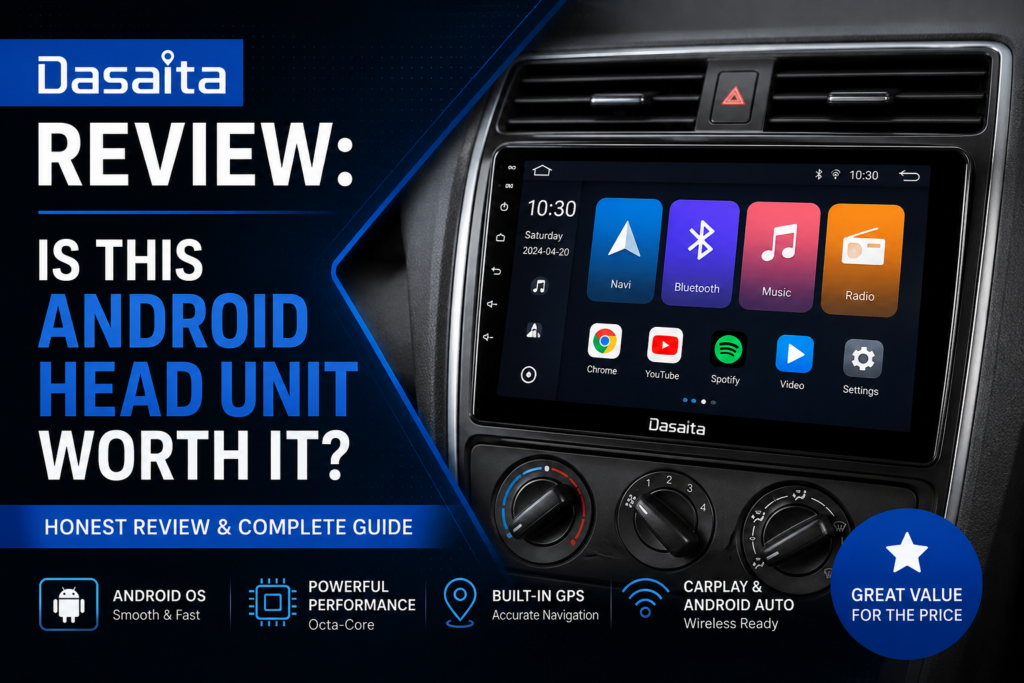
What Is Dasaita?
Dasaita is an aftermarket automotive electronics brand specializing primarily in Android-based head units.
Unlike a portable CarPlay screen, a Dasaita system is designed to replace the original infotainment or stereo unit in compatible vehicles.
Many models include vehicle-specific:
- Dashboard trim
- Wiring harnesses
- CANBUS integration
- Steering-wheel-control support
- Factory camera integration
- Audio connections
The goal is to create something much closer to an OEM-style installation.
Once installed, the head unit effectively functions as an Android tablet built into your dashboard.
Depending on the model and configuration, you can get features such as:
- Wireless Apple CarPlay
- Android Auto
- Google Maps
- Waze
- Spotify
- YouTube Music
- Bluetooth
- Wi-Fi
- GPS navigation
- Play Store apps
- Backup camera support
- Steering-wheel controls
- USB connectivity
- DSP audio processing
This makes Dasaita significantly more flexible than a basic CarPlay receiver.
Why Upgrade to an Android Head Unit?
Factory infotainment systems age surprisingly quickly.
A car that’s mechanically excellent may still have a stereo with:
- A small display
- Outdated navigation
- Slow Bluetooth
- No CarPlay
- No Android Auto
- Limited music integration
- Poor touchscreen responsiveness
Replacing the entire vehicle obviously makes no sense just to gain modern infotainment.
An aftermarket Android head unit provides another option.
You keep the car while replacing one of the parts that makes it feel old.
For vehicles from the 2010s in particular, this can make a dramatic difference.
What Does Dasaita Sell?
Dasaita offers numerous vehicle-specific head units rather than one universal product.
You’ll find configurations designed for vehicles from manufacturers such as:
- Toyota
- Honda
- Nissan
- Subaru
- Jeep
- Ford
- Volkswagen
- Mazda
- Mitsubishi
Exact compatibility varies substantially by model year, trim level, factory amplifier, camera system, and original infotainment configuration.
This is why checking your exact vehicle configuration before ordering is essential.
Dasaita G13
The G13 represents one of Dasaita’s newer Android head-unit platforms.
It combines relatively powerful Android hardware with large vehicle-specific displays and features such as wireless CarPlay and Android Auto.
Depending on the vehicle-specific configuration, buyers may find options with substantial RAM and storage.
This matters because Android head units aren’t simply displaying CarPlay.
If you use native Android applications, the processor, RAM, and storage directly affect responsiveness.
A better-equipped unit can feel much closer to a modern tablet than older low-cost Android stereos.
Best for:
Drivers who want a powerful Android-based infotainment system rather than simply adding CarPlay.
Dasaita Vivid Series
The Vivid platform is another important part of the Dasaita ecosystem.
Vivid is designed around an Android interface optimized for use inside a vehicle, with access to navigation, media, vehicle functions, and compatible applications.
The main attraction is flexibility.
Instead of being locked into the limited features provided by a traditional car stereo, users can run compatible Android apps directly on the head unit.
That potentially includes:
- Google Maps
- Waze
- Spotify
- YouTube Music
- Internet radio
- OBD applications
- Vehicle monitoring apps
With an internet connection through Wi-Fi, hotspot, or supported mobile connectivity, the head unit becomes much more independent from your smartphone.
Apple CarPlay
For many buyers, Android itself isn’t actually the most important feature.
It’s Apple CarPlay.
Compatible Dasaita head units can provide wireless CarPlay, allowing an iPhone to connect without plugging in a cable every time you enter the vehicle.
CarPlay provides familiar access to:
- Apple Maps
- Google Maps
- Waze
- Spotify
- Apple Music
- Podcasts
- Messages
- Phone calls
- Siri
Once everything is configured properly, the experience can be much more convenient than using an older factory stereo.
The large displays available on many Dasaita systems also work particularly well with navigation.
Android Auto
Android users receive a similar experience through Android Auto.
You can access:
- Google Maps
- Waze
- Spotify
- YouTube Music
- Phone
- Messages
- Google Assistant
However, connectivity deserves some context.
Users have reported occasional wireless Android Auto or ZLink connection problems on some configurations. In July 2026, for example, several G13 owners reported repeated Android Auto disconnections on Dasaita’s own forum. Dasaita support attributed that particular cluster of reports to an Android Auto 17.2 software bug and recommended temporarily rolling back to version 17.0.
That’s a useful reminder that connectivity problems aren’t always caused by the head unit itself.
Phones, Android Auto versions, firmware, and the head unit can all influence reliability.
Native Android Apps
This is where Dasaita becomes much more interesting than a conventional CarPlay stereo.
Because the head unit runs Android, compatible apps can operate directly on the unit.
Instead of:
Phone → CarPlay → Head Unit
you can potentially use:
Head Unit → Android App
For example, some owners use their phone’s hotspot to give the Dasaita internet access and then run navigation or media apps directly.
One long-term owner described using the system this way for applications including media and navigation, while praising its large screen and broad functionality despite some Bluetooth latency and connection quirks.
For technology enthusiasts, this flexibility is one of Dasaita’s strongest advantages.
Installation
Installation varies enormously by vehicle.
For compatible cars, Dasaita often provides vehicle-specific trim and wiring that can make the process considerably easier than installing a generic double-DIN stereo.
A typical installation may involve:
- Removing the factory dashboard trim.
- Disconnecting the factory head unit.
- Connecting the Dasaita wiring harness.
- Connecting the CANBUS adapter.
- Connecting GPS, USB, microphone, and camera cables.
- Installing the new display and trim.
- Configuring vehicle-specific settings.
Some owners report relatively straightforward installations. One Toyota Tundra owner, for example, described Dasaita as one of the easiest head units they’d installed, while another reported completing an installation in roughly 90 minutes.
But this shouldn’t be interpreted as universal.
Modern cars can have surprisingly complicated electronics.
Vehicle Compatibility Is Critical
This is probably the single most important thing to understand before buying Dasaita.
Two vehicles with the same model and year can still have different:
- Factory stereos
- Premium audio systems
- Amplifiers
- Cameras
- Steering-wheel controls
- USB ports
- Climate-control integration
A head unit compatible with the base audio system may not work correctly with the premium JBL, Bose, Harman Kardon, or other amplified system.
This is where buyers need to be careful.
There are real-world reports of users losing certain factory functions after installation, including steering-wheel buttons, AUX/USB functionality, camera behavior, or information displayed elsewhere in the vehicle.
That doesn’t mean every Dasaita installation causes these problems.
It means compatibility should be verified before purchase rather than assumed.
Steering-Wheel Controls
Many Dasaita installations support factory steering-wheel buttons through CANBUS integration.
When everything is configured correctly, controls for functions such as:
- Volume
- Track selection
- Phone calls
- Voice assistant
may continue working.
But exact behavior varies by vehicle.
For example, a 2026 Vivid 13 owner reported that the steering-wheel controls continued working after installation but some button functions were remapped compared with the original stereo.
Again, vehicle-specific research matters.
Backup Camera Integration
Many buyers want to retain their original backup camera.
Dasaita provides camera integration on many vehicle-specific systems, and some installations can continue using the OEM camera.
This can create a very clean upgrade because you don’t need to mount another camera.
However, compatibility isn’t identical across every vehicle.
Some users report differences in:
- Resolution
- Dynamic guidelines
- Camera activation
- Image quality
If retaining the factory camera is essential, verify the exact configuration before ordering.
Audio Quality
One advantage of replacing the head unit instead of adding a portable display is better potential integration with the car’s audio system.
Dasaita units can include features such as:
- Equalizer controls
- DSP processing
- Balance and fader
- Subwoofer controls
- Multiple audio outputs
Some owners report noticeable improvements compared with their factory stereos after adjusting the audio settings.
However, the result depends heavily on the vehicle’s existing audio system.
Cars with premium factory amplifiers can require additional integration hardware or specific compatible configurations.
Display Experience
Large displays are one of Dasaita’s biggest visual advantages.
Replacing a small factory screen with a large modern touchscreen can completely change how the dashboard feels.
Navigation becomes easier to see.
Album artwork looks better.
CarPlay has more room.
The entire interior can appear several years newer.
This is one reason Dasaita has a loyal following among owners of vehicles such as Toyota 4Runners, Tacomas, Tundras, and older Hondas.
But bigger isn’t automatically better.
Some users report:
- Screen glare
- Excessive nighttime brightness
- Large displays dominating the dashboard
A Toyota Tundra owner, for example, praised the unit overall but noted that nighttime brightness could be an issue.
Performance and Responsiveness
Modern Dasaita hardware is considerably more capable than older Android head units.
But expectations still matter.
A head unit doesn’t necessarily behave exactly like a flagship smartphone.
Some users report excellent responsiveness.
Others experience:
- Occasional lag
- Random reboots
- App compatibility problems
- Connection glitches
- Slow startup behavior
A recent G13 owner specifically criticized inconsistent boot behavior, occasional lag, app problems, and reliability glitches.
Conversely, other G13 owners report being extremely happy with the platform and using native Android apps extensively.
The real-world experience therefore appears more variable than with highly standardized infotainment systems from major automotive electronics brands.
Software and Firmware
Software is one of the areas where Android head units can require more patience.
Dasaita maintains a support forum where firmware information and troubleshooting discussions are available.
That’s useful, but it’s still a more hands-on experience than simply owning an OEM stereo.
Occasionally you may need to:
- Change settings
- Update firmware
- Reset an application
- Re-pair your phone
- Adjust CANBUS settings
- Troubleshoot a vehicle-specific feature
For technically comfortable buyers, that may not be a major problem.
For someone who expects everything to work perfectly without configuration, it can be frustrating.
Customer Feedback
Dasaita has one of those product categories where customer feedback can be extremely polarized.
Some owners love their units and keep them for years.
Others encounter enough technical problems that they eventually replace them with a more traditional stereo.
What Owners Like
Positive feedback commonly mentions:
- Large displays
- Modern dashboard appearance
- Wireless CarPlay
- Android Auto
- Native Android apps
- Vehicle-specific fit
- Good value compared with premium head units
- Straightforward installation on supported vehicles
- Extensive customization
There are owners reporting years of successful use. One user discussing a five-year-old Dasaita unit praised its price, stable CarPlay/Android Auto once connected, included wiring, audio quality, and the way the large screen modernized the vehicle interior.
Common Complaints
Reported negatives include:
- Random reboots
- Bluetooth latency
- Connection issues
- Firmware quirks
- Microphone quality
- Factory-feature compatibility
- Screens or hardware failing
- Customer-support frustrations
Dasaita’s Trustpilot footprint is currently very small—only four reviews in the snapshot we found—so its low score there isn’t statistically useful enough to treat as representative of the whole customer base.
For that reason, we place more weight on the pattern across owner communities rather than presenting one review-platform score as definitive.
Dasaita vs Carpuride
This is one of the most useful comparisons for Persiavo readers because the two products solve the same basic problem in very different ways.
Dasaita
You remove the original head unit and install a new Android infotainment system.
Advantages:
- Cleaner integrated appearance
- Native Android apps
- Large display
- Better potential audio integration
- More factory-like installation
Disadvantages:
- More complicated installation
- Vehicle compatibility matters
- Greater risk of affecting factory features
- Harder to remove or move to another vehicle
Carpuride
You leave the factory stereo untouched and mount another display on the dashboard.
Advantages:
- Very easy installation
- Doesn’t require dashboard modification
- Easy to remove
- Easy to move between cars
- Lower compatibility risk
Disadvantages:
- Less integrated appearance
- Visible cables
- Audio routing can be less elegant
- Adds another screen rather than replacing the old one
If you’re undecided between the two approaches, read our Carpuride Review 2026 for a closer look at portable CarPlay displays.
A simple way to choose is:
Want maximum integration? → Dasaita
Want minimum installation hassle? → Carpuride
Dasaita vs Traditional Pioneer, Sony, Alpine or Kenwood Head Units
There’s another important comparison.
Established automotive audio manufacturers typically prioritize reliability, audio performance, and polished CarPlay/Android Auto integration.
Dasaita prioritizes flexibility.
A conventional head unit may give you:
- Better long-term software consistency
- Strong dealer/install network
- More predictable support
- Mature audio processing
- Highly polished basic functions
Dasaita may give you:
- Much larger vehicle-specific display
- Native Android
- More apps
- Greater customization
- OEM-style trim for specific vehicles
- More features for the money
Which approach is better depends on what you expect from the stereo.
If you mainly want CarPlay that works every single time, a premium traditional head unit may be worth the additional cost.
If you want an Android tablet integrated into the dashboard, Dasaita is much more interesting.
Pros & Cons
Pros
✔ Large vehicle-specific touchscreens
✔ Wireless Apple CarPlay
✔ Android Auto
✔ Full Android operating system
✔ Google Play apps
✔ Google Maps and Waze
✔ OEM-style installation on many vehicles
✔ Steering-wheel-control support on compatible setups
✔ Backup-camera integration
✔ Extensive audio customization
✔ Good hardware specifications on newer models
✔ Can dramatically modernize an older vehicle
Cons
✘ Installation is more involved than a portable CarPlay display
✘ Exact vehicle compatibility can be complicated
✘ Some factory features may not work perfectly
✘ Software occasionally requires troubleshooting
✘ Customer experiences with reliability are mixed
✘ Bluetooth and wireless connectivity issues are reported by some owners
✘ Large screens can produce glare or excessive nighttime brightness
✘ Support experience appears inconsistent
Is Dasaita Legit?
Yes.
Dasaita has been selling Android automotive head units for years and maintains an active product ecosystem and support forum.
There are also numerous owner communities discussing installation, firmware, troubleshooting, and long-term experiences.
The more important question isn’t whether Dasaita exists or ships products.
It’s whether this type of Android head unit is right for you.
Dasaita products provide considerably more flexibility than traditional stereos, but that flexibility comes with more potential complexity.
Is Dasaita Worth It?
For the right buyer, yes.
Dasaita makes the most sense when you have an older vehicle you plan to keep and want to dramatically modernize its infotainment system.
Going from a small, outdated factory radio to a large Android touchscreen with:
- Wireless CarPlay
- Android Auto
- Modern navigation
- Streaming music
- Android apps
- Camera integration
can completely change the daily driving experience.
The hardware also provides considerably more freedom than a traditional stereo.
But we wouldn’t recommend buying one without doing vehicle-specific research first.
Check your:
- Model year
- Trim
- Factory amplifier
- Camera system
- Steering-wheel controls
- Original head unit
before ordering.
That extra research is what separates a potentially excellent Dasaita upgrade from a frustrating installation.
Who Should Buy Dasaita?
Dasaita is particularly suitable for:
- Owners of older vehicles
- Drivers planning to keep their car for several more years
- Android enthusiasts
- People who want a large infotainment screen
- Wireless CarPlay users
- Android Auto users
- Drivers who want native apps
- DIY automotive enthusiasts
- Buyers who value customization
Who Should Look Elsewhere?
Consider another option if:
- You want the simplest possible installation.
- You don’t want to remove the factory stereo.
- OEM reliability is your highest priority.
- You’re uncomfortable troubleshooting Android software.
- Your vehicle has a complicated premium audio system.
- You want a stereo with extensive local dealer support.
In those situations, a portable system such as Carpuride or a professionally installed Sony, Pioneer, Alpine, or Kenwood unit may be a better fit.
Frequently Asked Questions
Is Dasaita a good brand?
Dasaita offers feature-rich Android head units that can provide excellent value for the right vehicle. Owner experiences are mixed, however, particularly around software quirks, compatibility, and long-term reliability.
Does Dasaita support Apple CarPlay?
Many current Dasaita head units support wireless Apple CarPlay. Always check the exact product specifications before purchasing.
Does Dasaita support Android Auto?
Many Dasaita models support Android Auto, including wireless functionality on selected units.
Can I install apps on a Dasaita head unit?
Yes. One of the biggest advantages of Android-based Dasaita systems is the ability to run compatible Android apps directly on the head unit.
Is Dasaita difficult to install?
Installation difficulty depends heavily on the vehicle. Some vehicle-specific kits are relatively straightforward, while others can require additional wiring, adapters, configuration, or professional installation.
Where can I find a Dasaita discount code?
Visit the Dasaita Store on Persiavo to check current coupon codes, promotions, and available offers before purchasing.
Final Verdict
Overall Rating: ⭐⭐⭐⭐☆ (4.1/5)
| Category | Rating |
|---|---|
| Features & Functionality | ⭐⭐⭐⭐⭐ 4.7/5 |
| Display & Interface | ⭐⭐⭐⭐☆ 4.5/5 |
| CarPlay & Android Auto | ⭐⭐⭐⭐☆ 4.2/5 |
| Audio & Customization | ⭐⭐⭐⭐☆ 4.3/5 |
| Vehicle Integration | ⭐⭐⭐⭐☆ 4.1/5 |
| Ease of Installation | ⭐⭐⭐⭐☆ 3.8/5 |
| Software & Reliability | ⭐⭐⭐⭐☆ 3.7/5 |
| Customer Support | ⭐⭐⭐☆☆ 3.4/5 |
| Value for Money | ⭐⭐⭐⭐☆ 4.3/5 |
| Overall Rating | ⭐⭐⭐⭐☆ 4.1/5 |
Dasaita can be an impressive upgrade for an aging factory infotainment system.
Its biggest strength is the amount of functionality it puts into a vehicle-specific package. Large displays, Android apps, wireless CarPlay, Android Auto, navigation, audio controls, and camera integration can make an older vehicle feel dramatically newer.
We also like that Dasaita isn’t simply another portable screen stuck on top of the dashboard.
When installed in the right vehicle, it can look like part of the interior.
However, that integration is also the source of its biggest weakness.
Replacing a factory head unit means interacting with existing cameras, amplifiers, steering-wheel controls, CANBUS systems, USB ports, and other vehicle electronics. Owner reports show that the experience isn’t always perfect, and some users encounter software, connectivity, or compatibility problems.
That’s why our recommendation comes with one important condition:
Verify compatibility with your exact vehicle before buying.
If everything matches and you’re comfortable with occasional Android troubleshooting, Dasaita provides an impressive amount of functionality for the money.
If you simply want wireless CarPlay with minimal risk and installation work, a portable display may make more sense.
Persiavo Rating: 4.1/5 – Feature-Packed and Impressive, but Compatibility Matters
Where to Buy Dasaita
Looking for the latest offer?
👉 Visit the Dasaita Store on Persiavo
Check available Dasaita coupon codes and current promotions before placing your order.
Ready to buy?
Before purchasing, confirm your vehicle’s year, trim, factory audio system, camera configuration, and original head-unit type to make sure you’re ordering the correct version.
Make Smarter Buying Decisions
Get new reviews, product comparisons, brand discoveries, and practical shopping guides delivered to your inbox.
New Reviews
Shopping Guides
Brand Discoveries